Some of your best visitors are invisible to you. They click the ad, read three pages, compare your plans and leave without a trace, because their browser runs an ad blocker that stops Snitcher’s tracker from loading.
A visit you paid for shouldn’t disappear because of where a script loads from. Now you get a say in where it loads from.
First-party tracking is now live. You can run Snitcher’s tracker from a subdomain of your own website, so more of the visitors you worked hard to get actually show up.
Why we built first-party tracking
Snitcher works through a small script on your website, called the tracker. It normally loads from Snitcher’s own domains.
Ad blockers have quietly become tracker blockers.
They work from shared blocklists that match trackers by the domain they load from and Snitcher’s domains are on some of the big ones. When a visitor’s blocker uses one of those lists, the visit never reaches Snitcher.
Every visit that comes through is a chance to find a company you can act on, in your Inbox (Snitcher’s list of who’s been on your site), your automations and your CRM. We wanted more of them to come through.
We built first-party tracking on three beliefs:
- At home: the tracker should load from your own website, like the rest of your pages.
- Self-serve: you should be able to set it up from tracker settings, with nothing to babysit afterwards.
- Predictable: you should know exactly what changes on your site before you switch it on.
We started with the visitors going missing.
(First-party is what the web calls anything served from the site you’re actually on. By default, the tracker wasn’t.)
Seeing even more of your visitors
With first-party tracking, the tracker loads from a subdomain of your own site (the kind of address your blog or help center might live on) and the visit data goes back through it too.
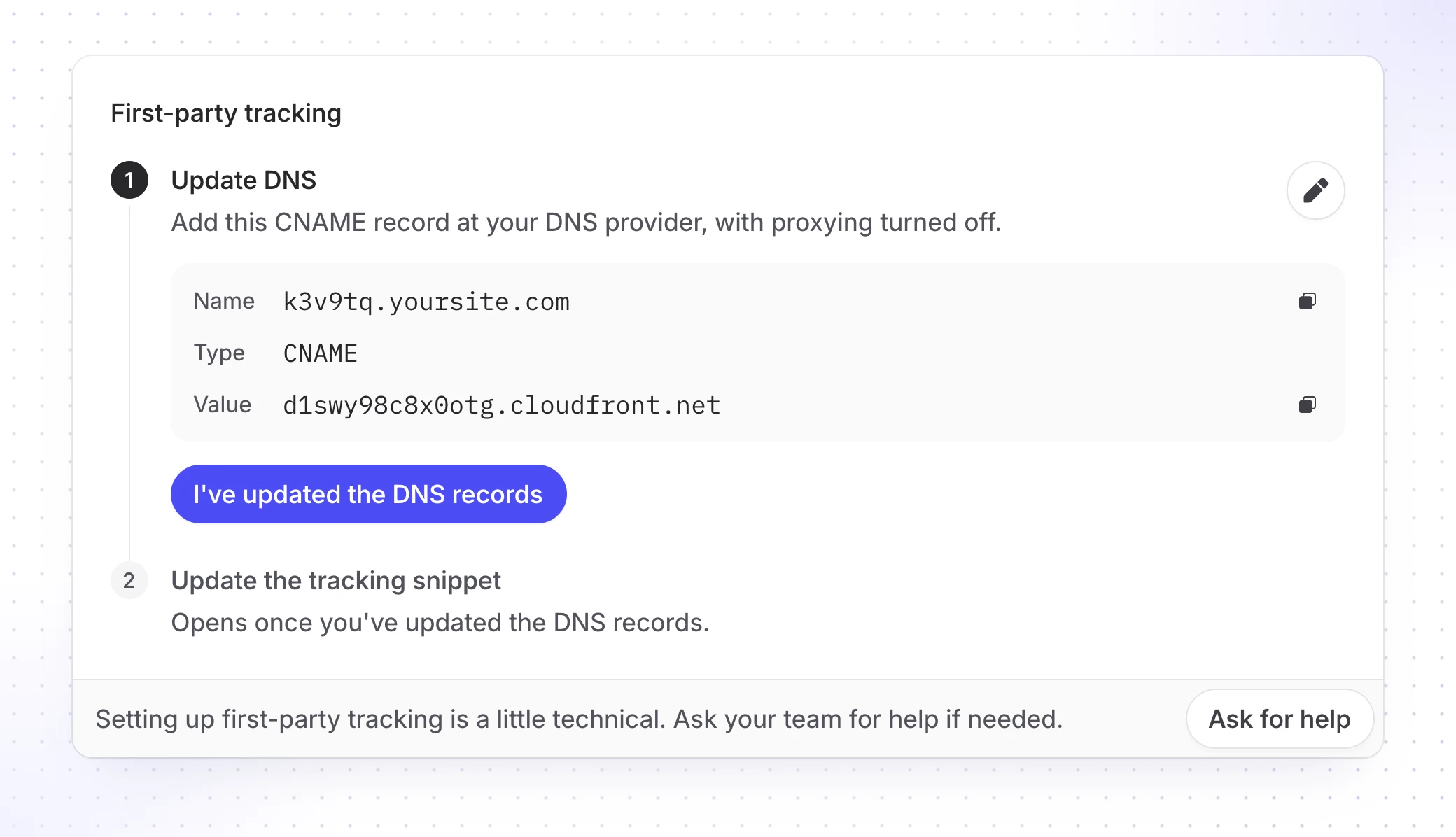
Snitcher picks a short random name for that subdomain on purpose, something like k3v9tq.yoursite.com, because blockers also catch obvious ones like analytics.yoursite.com. (Your visitors never see it, so it doesn’t need to be pretty.)
A blocker that was stopping Snitcher’s domain now sees what looks like the rest of your website and lets it through. The visit reaches Snitcher and the company behind it gets the same shot at being identified as everyone else.
Setting it up from tracker settings
Running Snitcher from your own domain used to be a project for a developer. Now it lives in tracker settings.
| Before | With first-party tracking | |
|---|---|---|
| Tracker loads from | Snitcher’s domains | A subdomain of yours |
| To set it up yourself | Build and run your own proxy server | Add one DNS record, then swap in the new snippet |
| Who can do it | A developer | Whoever can edit your DNS and your snippet |
Start setup there and Snitcher shows you the one DNS record to add (a single line in your domain settings, the same kind you add when you set up a new email tool). If someone else runs your DNS, the Ask for help button emails it to them.
Tracker settings then gives you a new snippet that loads through your subdomain. Once the subdomain is live, swap it in wherever the old one sits, tag managers and site builders included.
Snitcher handles the security certificate, the padlock in the address bar, and keeps it renewed so nobody has to remember it exists.
Knowing what changes when you switch it on
Before you switch it on, here’s what changes and what doesn’t:
- Your snippet: changes once and Snitcher tells you if a page is still running the old one.
- The DNS record: stays in place after setup. The certificate renews through it and the new snippet only works while the record is there.
- If you don’t set it up: nothing changes. The tracker keeps loading from Snitcher’s domains, as it always has.
The visits you already paid for
Getting the right companies to your site costs something: ad budget, content, the odd conference stand. Then a blocklist decides some of them never arrived.
How many companies read your pricing page last month and never showed up in your Inbox? Which of them would you have called? And how would you ever know?
First-party tracking is the latest step in getting those companies into Snitcher, where you can do something about them.
Available now, on every workspace. You’ll need your website on your own domain, not a shared one like yoursite.webflow.io.
Open tracker settings, start counting →
(The whole thing started when an ad blocker at home blocked us. Rodrigo, the staff engineer who got blocked, tells that story in Source Code: Behind first-party tracking.)